


Cue2Keys 2: The Second Generation Full Modular Keyboard
Available now
Cue2Keys 2 Starter Set
A set with all the parts needed to get it working. No soldering required.
Standard
¥21,000(tax incl.)
Parts for building a 56-key split keyboard
DX
¥26,000(tax incl.)
Standard plus one magnetic key module (4 keys), a trackball, a knob, and a display
Table of Contents
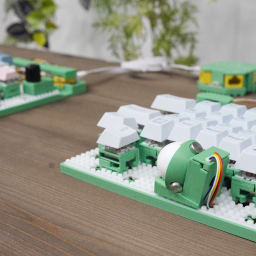
"Cue2Keys 2" is a module-oriented keyboard that you can assemble like LEGO® blocks.
It is on sale on BOOTH.
Please also see the official website for details.
By treating the keyboard as one system and connecting each component as a subsystem with cables, you add functions and build the configuration.
Because of that, it is easy to adjust the physical key layout (major layouts such as column staggered and row staggered, as well as position adjustments). It is also easy to increase or decrease the number of keys.
I first sold it at Keyket 2026 on March 28, 2026. Please see this article for the lineup on that day.

How to Buy
I sell the starter set on BOOTH in two editions: Standard and DX.
The Standard edition is a set of parts for building a 56-key split keyboard.
The DX edition adds one magnetic key module (4 keys), a trackball, a knob, and a display to the Standard edition.
Each module and the upgrade kit are also available individually.
- Key / Magnetic Key
- Trackball
- Knob
- Display
- Hub
- Pendant
- Base / Base Case
- Chips
- Upgrade Kit (Original to 2)
Features
Please see this article for the feature introduction.

Documentation Including the Build Guide
I have published various documents on GitHub.
They include the build guide, purchase guide, customization guide, firmware information, and more.
